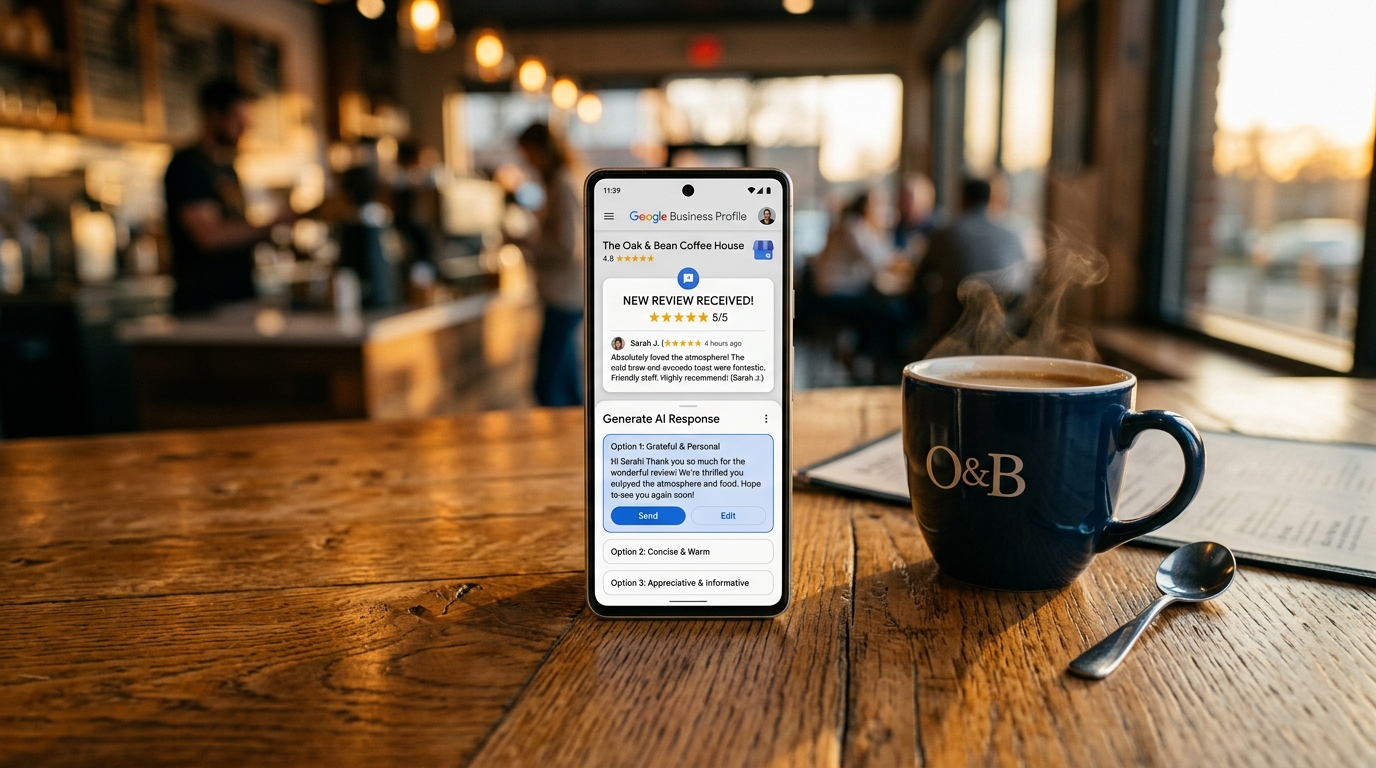
How AI helps you manage Google reviews without losing customers
Use AI for automated alerts, empathetic responses with ChatGPT, and more positive reviews on Google. Step-by-step guide with free tools for restaurants, stores and hotels in just 15 minutes.
Think about when you're caught in the store or kitchen and a negative review comes up on Google-you fail to respond right away, and meanwhile potential customers see only low stars and choose another place. With AI managing reviews, you can set up automatic alerts, create sincere responses in seconds, and collect more positive reviews without devoting hours every day. Basically, this step-by-step guide tells you how to set it all up, using free ready-made tools for your restaurant, store, or hotel for a stronger reputation.
What you need before you get started.
To get started, set up these basics in just 15 minutes, without spending a euro. First, create a Google Business Profile account (free, formerly known as Google My Business): this is where you see and manage all your reviews. If you don't have one, go to business.google.com, search for your business and claim it with address and phone, verified by text or mail.
Then, open ChatGPT (free at chat.openai.com) to generate personalized responses-just set up an account with your email in a minute. Download WhatsApp Business (free on the Play Store or App Store) to send links to reviews and do quick follow-ups. Finally, use Canva (free plan at canva.com) for QR codes that lead straight to your Google page. You only need 20 minutes for the initial setup, then 2-5 minutes a day to check everything.
If you already have a CRM or marketing tool, integrate what you need there. For those who prefer a single platform, Leader24 combines AI alerts and automated responses on WhatsApp and site, perfect for small businesses.
Step 1: Enable automatic notifications for new Google reviews.
There's no point in checking your Google Business Profile every hour: better to set up alerts that alert you as soon as a new review comes in. Open the Google Business Profile app on your phone (download it if it's missing), go to "Notifications" in settings - hamburger button on the top left, then Settings and Notifications. Turn on "New Reviews" and choose email or push notifications-you'll see a preview like "Get alerts for customer interactions."
For added security, also set up Google Alerts at google.com/alerts. Type '"name your business" reviews' (e.g., "Pizzeria Milano reviews"), click "Show options," set frequency "Real-time" and email delivery. Confirm with "Create alert," and you will receive a message within minutes, with direct link to the review. After setup, test everything by asking a friend to leave a test review: within 5 minutes the notification arrives, so you save hours and respond within 24 hours, showing customers that you pay attention.
Step 2: Respond to negative reviews with empathetic AI templates.
When you get the alert of a negative review, avoid improvising: the AI gives you a warm response that can turn a disappointed customer into a regular one. Open ChatGPT and paste this prompt: "Write an empathetic and professional response in Italian for this negative Google review about [copy review text] for a [restaurant/shop/hotel]. Start with thank you, apologize for the precise problem, offer a concrete solution such as 'contact me for a coupon,' and close by inviting a return."
Here are examples to adapt right away:
- For restaurant: "Thank you for your sincere feedback. I'm really sorry for the delay on the table that night - it was an unusual peak. Contact me at [your number] for complimentary coffee next time. We hope to have you back soon!"
- By store: "I appreciate you sharing your experience. I regret the product mix-up. Tell me how I can make it up to you with a discount on your next purchase."
- To hotel: "Thank you for reporting the problem with the room. We apologize for the inconvenience and offer you a free upgrade at your next check-in."
Send the prompt, and in 10 seconds you have the text ready: copy it to the Google Business Profile panel, open the review, and click "Reply." The customer sees it publicly, and the reader notices your professionalism. Repeat for every negative, and you'll see many come back, balancing out the low stars.
Step 3: Generate personalized and fast responses with 24/7 AI.
To make responses always sound human and unique, add details of your business to the prompt, without fixed templates. In ChatGPT, change the one in Step 2 to, "Personalize with [details: e.g. 'we offer fresh homemade pasta' for restaurant]. Friendly tone like a local owner, max 100 words." That way you get custom texts.
For follow-ups, use WhatsApp Business: after a service, send "Hi! How was your visit? Would you like to leave a review here? [Google link from business.google.com > Share > Copy link]." If it is negative, generate the AI response and send it in private chat before posting it on Google. For example, for a hotel with weak WiFi: "Thanks [name], sorry about the unstable WiFi-we're upgrading. Try our free hotspot now or tell me if you need immediate help."
The benefit is having consistent responses even at night, with no errors due to fatigue. If you want an integrated system, Leader24 manages the transition between AI and you on WhatsApp and site. After 3-5 responses, your profile seems more active and reliable.
Step 4: Ask for 5-star reviews only from satisfied customers.
To counterbalance the negatives, collect positives immediately after service, without overdoing it. Try Mailchimp (free up to 500 contacts at mailchimp.com): create an account, go to "Campaigns" > "Email" and use a "Thank you for your purchase" template. Add: "Thank you for the trust! If you liked it, leave 5 stars on Google: [insert link from your reviews page]," personalizing it with the name from the CRM or receipt.
Set it to be sent automatically 24 hours later. For point of sale, create a QR with Canva: search for "QR code generator," paste the Google reviews link and download the PNG. Print on table or counter, "Happy? Scan for 5 stars!" In a restaurant, a QR on the bill brings 2-3 positive reviews per night. Ask only those who are happy-verbally "Everything OK?" - and the negatives dilute themselves.
Step 5: Handle fake or unfair reviews by reporting them and overwhelming them.
If a troll or mistake happens, report but cover with real opinions. In Google Business Profile, open the fake review, click "Report Review," choose the reason as "Not Real Customer," and submit: Google checks with its AI and removes if it is spam. Meanwhile, use Canva's QR to collect authentic: put it on a poster or send it via WhatsApp to 10 recent customers with "Help us with a genuine review?"
For example, in one store a "Never been here" review disappears under 8 positive in 3 days thanks to email. For a professional QR or site (useful for Google Business), look at agencies like Sevedo for simple web apps. Don't get heated: respond neutrally "Thanks, let's check internally" and focus on real opinions.
Step 6: Integrate with local marketing for more visibility.
Link reviews to Google Analytics (free at analytics.google.com): put it on site (basic setup in 5 minutes with tag) and track clicks from Google on "book" or "call". On WhatsApp Business, look at "Stats" for messages related to reviews. For restaurants or hotels, check out Leader24 sectors for tailored ideas.
How to verify that it works.
After 7 days, check in Google Business Profile > Insights: if "Search and impressions" go up 10-20% in clicks, it brings real customers. Are new reviews outpacing old ones? Are profile views increasing? Search "your Milan restaurant": are you higher? Track calls or reservations from "I saw a review".
Common mistakes and how to fix them.
If notifications aren't coming in, check your spam folder and turn Google Alerts back on. AI responses too cold? Add "friendly tone from Italian owner" to the prompt. Few positives? Ask only after a good experience, not at all. QR not working? Test it with another phone and resize the image. Reports ignored? Collect 5-10 genuine reviews instead of waiting.
Start today with Google Alerts: in 5 minutes the first notification arrives. Managing reviews with AI becomes easy routine, and local customers arrive without stress.
Ready to transform your customer service?
Activate your AI assistant on WhatsApp in 5 minutes. 30-day free trial, no credit card required.
Fonti
Related articles

Analisi dei cicli di vendita: come prevedere i picchi di lavoro
Scopri come analizzare i cicli stagionali del tuo negozio per prevedere i picchi di lavoro, gestire le vendite e automatizzare i processi senza stress.
Online Safety for Minors: A Practical DSA Guide for Your E-Commerce Business
Find out how the DSA affects your e-commerce business. Protect minors, manage privacy, and build customer trust with practical tips.
An Invisible Website and Lost Customers: How to Improve Visibility
Is your website hard to navigate or invisible on Google? Find out how to fix common mistakes, improve your site search, and avoid losing valuable leads.