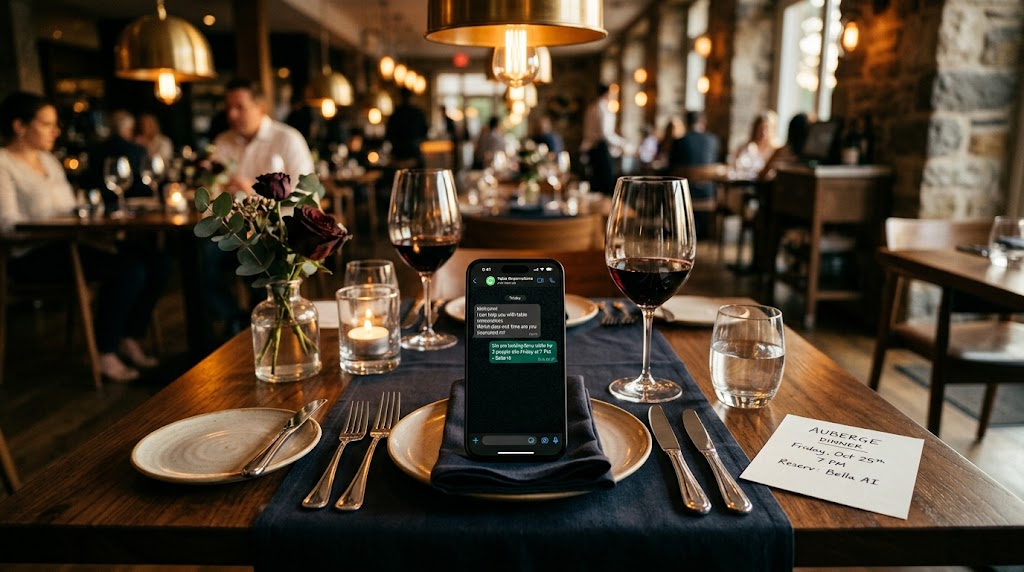
How WhatsApp's AI is changing restaurant and hotel reservations
Learn how AI on WhatsApp manages 24/7 reservations for restaurants and hotels, reduces no-shows, saves time with practical examples, WhatsApp Business and free tools like Google Calendar.
How WhatsApp's AI is changing restaurant and hotel reservations.
Imagine you are Marco, owner of a busy restaurant in Rome with a few guest rooms. It's 10:30 p.m., you're closing in the kitchen after a busy day, and a WhatsApp message arrives from a couple: "Table for 4 tomorrow night at 8 p.m.?" You can't answer right away because you're busy, and the next day you find out they've chosen a nearby place. Or maybe a customer texts you at night to confirm check-in and parking, but you're in bed and miss a chance to build loyalty. Situations like these often happen to hospitality workers, and WhatsApp chats have become crucial in keeping customers from running away.
This is why the AI of WhatsApp comes into play**, which responds immediately, day and night, checks for true availability and confirms everything without you having to intervene. No more lost messages late at night or empty tables due to delays. In fact, with AI for restaurants and hotel customer service, you reduce losses from missed responses and increase direct bookings, without going through sites like Booking. In this article I guide you step by step on how it works, with examples from everyday, and tell you how to get started today with easy-to-use tools. So you turn those chats into paying customers.
Why do your customers hate waiting for a response on WhatsApp?
Customers on WhatsApp want a quick response, and if you wait even a few hours, they often book elsewhere. Everyone has their phone in their hand all the time, so an unread message after 10 minutes feels like a closed club in the face of someone who walks in.
Think of Marco receiving "Table for 6 tonight?" from a customer on the train. If he doesn't respond in 5 minutes, that one moves on to the next restaurant with an active bot. The AI for restaurants solves everything: it reads the message, looks at the shared calendar, and replies in seconds with "Yes, I have three tables at 8 p.m. for 6 people. Confirm?" It's not complicated, it's just automation that sounds like a real receptionist, but without the need for breaks or sleep. The same is true for rooms: a tourist asks "Free the 15th with a view?", the AI checks the stock, proposes options and closes the W WhatsApp reservation there and then.
In practice, you get full tables even on slow days, fewer last-minute cancellations because the customer feels followed. WhatsApp messages sent 24-48 hours in advance cut out no-shows, as happens to those who use automatic confirmations. You win extra coverages without overnight staffing. To get started, download WhatsApp Business, free, with basic quick replies and chat tags: it sets up in 10 minutes on your phone and puts you ahead of those who use only the personal app.
If you're looking for ideas for your industry, discover hospitality industries.
How does AI automatically respond to booking requests?
The AI understands the message, checks availability, and confirms table or room via WhatsApp, just like a live assistant. It does not repeat fixed phrases: it interprets things like "pizza for two on Friday" and gives concrete options.
For example, for Marco's restaurant comes "2 places for pizza on Friday the 20th?" The AI for restaurants plugs in the calendar, finds free spaces and sends "Perfect, confirmed at 8 p.m. for 2. Deposit 10€ here to block it [payment link]. Here is the pizza menu." In 30 seconds you have a reservation with money in it. For rooms it works the same: "Check-in October 14, parking?" and the AI confirms, adds details and sends the map. It even handles changes, like "Shall I move to the 15th?", checks and updates. Tools like AiDA for tourism link WhatsApp to voice, email, and reservations in one stream, without manual errors.
The benefits are clear: always available responses mean zero lost customers overnight, and the team is dedicated to the room instead of chatting. Google Calendar is just fine: it's free, you share it with AI for real-time checks via a simple API link, ready in 15 minutes. For natural chats, ChatGPT (free version): ask "Write 5 answers for restaurant reservations" and copy them into WhatsApp Business. Zero cost to test, and sounds like real dialogue.
If you prefer a AI for restaurants and hotels without code, Leader24 passes the baton to a human operator when needed, with easy integrations from a single panel.
How do you reduce no-shows and maximize reservations with AI?
AI sends automatic reminders via WhatsApp the day before, reducing absences and filling in the blanks. Instead of calling 50 customers by hand, you automate confirmations that come directly to your phone.
For Marco's restaurant, after the reservation starts "Confirm table 7:30 p.m. for 4? If not, I'll clear it." The customer answers "S" and you're good to go. Platforms like Plateform add these alerts, even with same-day calls, to reassign tables or rooms in real time. So you maintain stable revenue even in the off-season.
You save time and make money: fewer no-shows means more covers, happy customers who come back. Calendly is perfect: free at the base, it creates links for direct bookings via WhatsApp, where customers choose slots from the shared calendar. It connects to Google Calendar in 5 minutes, no charge. To organize, Trello: make a "Reservations" board with cards per client, move from "To be confirmed" to "Ok" from phone. Free, clear for small teams.
These steps boost Preservations WhatsApp: start with basic reminders, see no-shows go down and revenues grow.
What free or low-cost tools to integrate with WhatsApp to get started?
Start with WhatsApp Business plus Calendly and Google Calendar to automate without spending a euro. It doesn't take an expert: in an hour you have a system that manages ** WhatsApp bookings** on its own.
Step one: WhatsApp Business (always free). Add menu catalog, responses like "Tell me date and place settings to book" and "Confirmed/Paid" labels. Second: Calendly (basic free, pro 12€/month), generate "Book here" link to send to chat, customers choose and pay deposit if you want, via copy-paste. Third: ChatGPT for texts, like "Create no-show reminder for restaurant," and use them in auto-response. Add Stripe for payments: "Pay 10€" link in chat, secure (1.4% +0.25€, setup free).
For hotels, Mailchimp (free up to 2000 contacts): send backup email if needed, with template for room confirmations. Google Analytics tracks chats: UTM tags on Calendly links to see how many bookings come in from WhatsApp. Total setup: 1 hour, zero cost. Result: +20% direct bookings in one week.
To test a complete system, 30-day free trial.
Real examples: restaurants and hotels winning with AI WhatsApp.
Restaurants and B&Bs like Marco's use chatbots for common questions, raising performance without complications. These are not big chains-they are normal places that apply basic tricks.
For example, AiDA for hotels connects WhatsApp to manage everything 24/7, from reservations to extras like parking, in fluid chat. Restaurants with phone AI register tables via chat, send WhatsApp confirmations and ask for feedback afterwards, "How was dinner? 1-5 stars." So you get instant reviews, better menus and repeat customers. A Tuscan B&B improved guest experience with WhatsApp automation, increasing direct bookings.
Try it in your restaurant: set AI for "Table/room?", reminders and surveys. Copy these approaches and see the numbers go up. Leader24 tracks chats to see what works, without complicated stuff.
Conclusion.
Download WhatsApp Business on your phone, set up a basic auto-response like "To book, tell me date and place settings" and test it with a friend. In 15 minutes you have chats that capture customers. Add Calendly for automatic slots and Google Calendar for real checks. Tomorrow an extra reservation: leave tonight with a test reminder.
Ready to transform your customer service?
Activate your AI assistant on WhatsApp in 5 minutes. 30-day free trial, no credit card required.
Fonti
Related articles
Come automatizzare la ricerca di informazioni con Perplexity AI
Scopri come usare Perplexity AI per automatizzare la ricerca di notizie e trend, risparmiando tempo prezioso nella gestione della tua agenzia di marketing.
AI Influencers on Instagram: How to Maintain Brand Authenticity
Find out how to use artificial intelligence on Instagram without losing your customers' trust—and why authenticity remains your best competitive advantage.

Zero Data Retention protects your customers' privacy
Learn how to manage customer data easily and securely with the Zero Data Retention strategy, reducing risks and building trust.