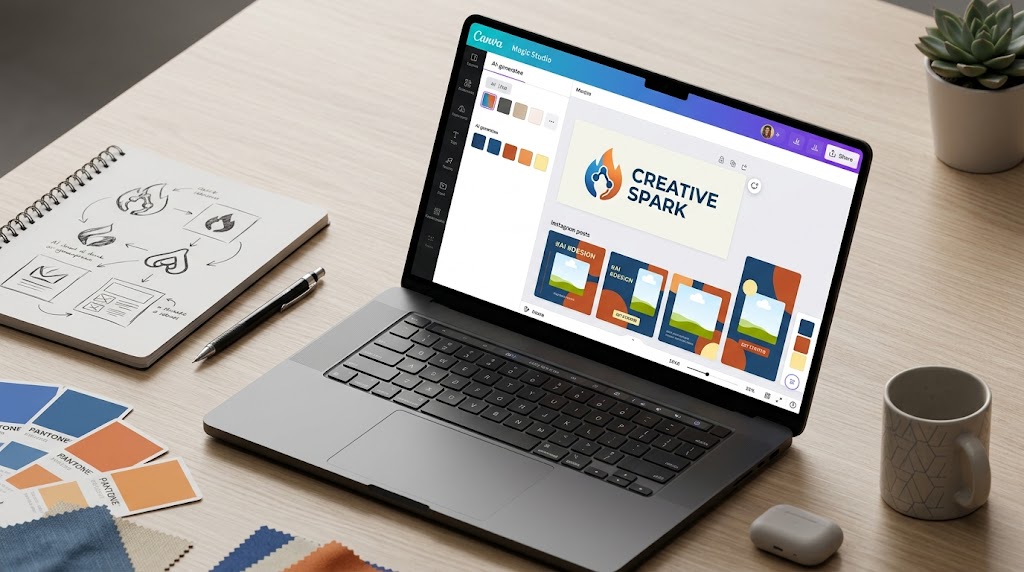
AI and design: how to create professional graphics without being an expert
Create pro graphics for social, logos and promotions with AI, no experience required. Practical guide to free tools such as Canva, Looka and CapCut for restaurants and small businesses.
AI and design: how to create professional graphics without being an expert
If you run a restaurant like Marco, every week you have to prepare graphics for social, banners, or promotions, but without design experience the results look homemade and don't attract customers. With AI and design tools, you can get professional visuals simply by describing what you need, so you save time and the money of an outside graphic designer. For example, for an Instagram post about a special offer, instead of going crazy with boring templates, AI comes up with ready-made options in minutes, perfect for your local marketing and your small business.
These tools make easy design accessible to entrepreneurs like you who don't have time to learn Photoshop. Basically, you get eye-catching posts, logos that give a consistent look, and banners that drive sales, all without complications. For more tips on how to improve your online business, check out the Leader24 blog. In this step-by-step guide I'll get you started today with free tools and phone apps, focusing on AI graphics for your real promotions.
What you need before you get started.
Before you launch your first professional AI graphics, get these basic elements ready so you're off to a flying start. Create a free account at Canva.com, most convenient for beginners, use ChatGPT for ideas, and download CapCut to your phone for quick touch-ups. You only need 15-30 minutes for the initial setup, then each graphic is ready in 5 minutes, no experience needed-all you need is the Internet and a clear description of your restaurant, like "offering Italian pizza."
For Canva, click "Register for Free" in the upper right corner, use email or Google, and confirm. Open chat.openai.com the same way. Download CapCut from the App Store or Google Play. If you have a site, check that it accepts image uploads, like on Shopify or WordPress. With that you're all set: start with free and upgrade to Canva Pro for about $12 a month if you need more.
What free AI tools to try to get started right away with basic graphics?
Among the easiest tools for an entrepreneur are Canva with Magic Studio AI and Looka.com, which start with your own text description to create graphics and logos. Let's start with Canva, ideal for social posts and quick flyers of your restaurant. Open the web or mobile app, click "Create a design" and choose "Instagram post" or "Flyer."
In the search bar, enter a prompt such as "eye-catching menu for restaurant: dish of the day with steaming pizza photo, red and green hot colors." Click "Magic Studio" or "Generate with AI" and get 4-6 ready-made variations, with editable text and AI-created images. Download in PNG or JPG and you're all set. Tool 1: Canva is free at the base, with pro plan at $12 per month.
Tool 2: Looka focuses on logos and branding, with free previews. Enter your business name and keywords like "modern Italian pizzeria," and AI generates 10 logo variations. Choose one, download the low-res version for free or pay 20-80€ for vector files. For Marco, describing "pizzeria with stylized pizza" gave a ready-made logo for business cards. Try it now: create a "2x1 weekend beers" flyer in 5 minutes, upload it to WhatsApp Business and see more bookings come in. These are tools for easy design in small businesses, with no learning curve.
Step 1: Create your first professional logo with Looka.
To turn an idea into a ready-made logo, use Looka or Canva AI: describe your restaurant and the AI generates a logo, color palette and font in seconds. Open the site, type the name as "Pizzeria Marco" and the sector "Italian restaurant." Select "minimalist" style from filters, and the AI shows you options with "See branding kit" for warm palettes and suitable fonts.
An effective prompt is "minimalist logo for pizzeria with interior view, warm reds, stylized pizza, simple font." Generate, adjust colors with slider and export to SVG for site. Tool 3: VistaCreate (formerly Crello, free with limits) at vistacreate.com does the same: search for "branding kit," enter prompt and get consistent social templates. So Marco created headers for site and WhatsApp in one click.
You save 300-1000€ compared to a freelancer, and consistency in branding makes clients feel more comfortable. A common mistake is not checking variants on mobile, so always resize on your phone. To widget site with your logo, look at Leader24 pricing plans. If you need help integrating it into the site, try agencies like Lab Creators, experts in digital branding.
Step 2: Generate quick social graphics with AI mobile app.
CapCut is perfect for entrepreneurs always on the go: edit videos and posts with AI that proposes layouts and text for Instagram or TikTok. Download it, open "New Project," and upload a photo of your dish, like a pizza on offer. Tap "AI Effects" or "Text-to-image," type "50% sale banner on pizzas, text bold red," and the AI adds graphics, transitions, and music on its own. Export in 1080p ready to use.
Tool 4: CapCut is free and designed for mobile. Marco created Stories with "flash pizza offer, dynamic style": he recorded a 10-second video and the AI optimized it. Alternatively, use the Canva app: open "Instagram Stories," prompt "pizza restaurant promotion," and generate layouts suitable for any screen. Post from anywhere, and customers react better to vivid images with more interactions. Upload them to WhatsApp Business for catalogs, too.
Step 3: Use ChatGPT for custom design ideas and prompts.
ChatGPT helps you create ready-made prompts for other tools or complete ideas: type "Describe a pizzeria banner with offers" and copy it into Canva. Tool 5: ChatGPT is free. Try, "Create a detailed prompt for Canva: pizzeria menu infographic, red and white colors, simple icons, 'pizza of the day' text." The output is like "Modern pizza restaurant banner, clean style, steaming AI pizza, call to action order now."
Copy into Canva "Magic Design," customize the text, and download. So Marco made a "Our Menus" infographic with visual bullet points. No more creative blocks, and the graphics fit your restaurant by site or WhatsApp. To integrate them into a livechat on the site, tools like Leader24 make them interactive to capture contacts, without programming.
Step 4: Integrate and optimize graphics into daily business.
Now upload graphics to your site, e-commerce, social, and WhatsApp Business for use every day. On Shopify go "Online Store > Themes > Customize" and put the AI banner in the header. On Instagram post directly from Canva, and on WhatsApp set the catalog with Looka photos. For Marco, a "Pizza weekend 10€" banner or post with menu worked great.
According to Unite.AI, with AI, jobs finish three times faster, perfect if you don't do full-time design. It results in more sales and satisfied customers. Keep everything consistent with Looka kit for colors and fonts.
What mistakes to avoid so you don't waste time with AI design?
To avoid wasting time, always use specific prompts such as "red pizza restaurant logo with stylized pizza, flat style," not vague like "nice logo." Overloading with colors is confusing, so stay on maximum three and choose ready palettes from the AI. Ignoring mobile makes you lose impact, so test resizing on your phone and use "mobile-first" templates in Canva.
Don't copy templates as is: add your own logo with "Elements." And always generate 3-5 variations, save them all in a "Favorites" folder. Marco failed with a generic "pizza" post, but won with "AI steaming margherita pizza offer, only 8€". Always review on various devices, so you avoid surprises.
How to verify that it works and common errors to fix.
To check if it works, post the graphic on Instagram or site and watch likes, comments and metrics over 24 hours, like clicks on Google Analytics for banners. On WhatsApp send it to 5 trusted customers and ask "Do you like it? Is the message clear?" If engagement goes up with more responses or bookings, you're doing well.
Common mistakes include wrong AI text, which you fix by editing by hand before saving. Images not in line with the brand? Always use the Looka palette. Heavy files? Export JPGs under 1MB. And back up to Google Drive. If it doesn't turn, reinforce the prompt and try again. For sector ideas, explore Leader24 sectors.
How to integrate AI graphics into your daily business?
Integrate graphics everywhere: custom widgets on site, social for promotions and WhatsApp for chats with images. On Shopify upload them in "Products > Images," on Facebook program Canva posts. For Marco, homepage banners with CapCut videos have brought in more orders.
Use Looka kit for consistency in colors and fonts on each channel. Customers notice professionalism and buy more because of striking visuals. If you have bookings, add graphics to Calendly links in bio.
Conclusion.
Open Canva now, type "Instagram post for pizzeria: pizza special with pricing, eye-catching style," generate three versions and post it today. In 10 minutes you'll see the likes coming in. Tomorrow, make a logo with Looka: describe your restaurant, download it and use it on menus. Try everything for free and measure the results with likes and sales in a week.
From Digital Cultures, so many start with free plans and grow slowly, and you can do the same. For a site chat with these graphics, free 30-day trial Leader24 makes it easy for you. The key step is to create a graphic today from Canva-don't wait, and your local marketing will get off to a great start without being an expert.
Ready to transform your customer service?
Activate your AI assistant on WhatsApp in 5 minutes. 30-day free trial, no credit card required.
Fonti
Related articles
Mistral Large 4: L'AI europea che garantisce sovranità dei dati
Scopri come Mistral Large 4 sta rivoluzionando l'uso dell'intelligenza artificiale nelle aziende europee, garantendo privacy, sicurezza e conformità GDPR.
Previsioni di magazzino: come usare NVIDIA Kumo sui tuoi dati
Scopri come superare la gestione manuale su Excel usando NVIDIA Kumo per previsioni di magazzino basate sull'intelligenza artificiale e dati storici.

Pubblicità intelligente: come l'AI cambia le tue vendite
Scopri perché il click non basta più e come l'intelligenza artificiale ti aiuta a gestire i lead, rispondere velocemente e chiudere più vendite ogni giorno.