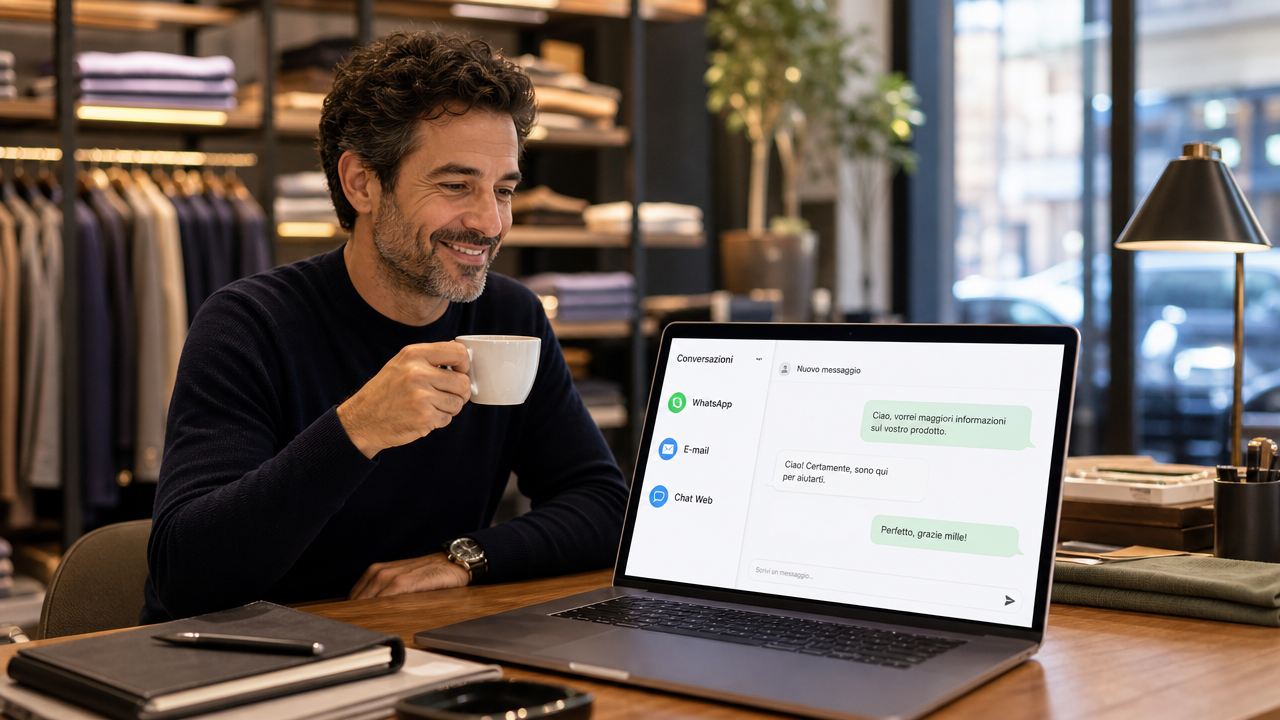
Manage WhatsApp, chat and email from one place
Tired of jumping between WhatsApp, email and chat? Find out how to unify communication channels to improve productivity and never lose any customers again.
Open WhatsApp. Three urgent messages. You switch to email: two complaints and a request for a quote. Meanwhile, the site alerts you to a ten-minute open chat. It's Monday morning and you're already bouncing between boards, apps and notifications. The problem is not the amount of work, but the fragmentation: customers write to you wherever they prefer, and for you each channel is a world apart. The goal of this article is to show you how to bring it all into one flow, without losing control.
Because your customers expect a response everywhere and right away.
The customer does not think in channels. To him, your brand is one: the message on WhatsApp is just as valuable as an email, and he expects you to acknowledge it either way. Continuity of experience is the real issue in modern customer service: as GetConnected points out, customers want to switch from one channel to another without having to do it all over again.
Think of a concrete scenario. A potential customer asks you for a quote via email. After two hours, gripped with anxiety, he writes you on WhatsApp, "Did you get my request?" If the messages are separate, you open the email, search, then go back to WhatsApp and reply: you have lost precious minutes and he already has the impression of slow service. If, on the other hand, the two channels speak the same language, you see the full conversation right away and respond in no time.
Why fragmentation costs you more than you think.
When requests arrive in no particular order, you risk leaving some behind. A web chat ignored, a WhatsApp read and never filed, an email that ends up in spam: every hole is a customer who feels neglected. You don't need to increase hours, you need a single collection point.
Fragmentation also has a hidden cost on the quality of responses. Without a shared history, you risk asking the customer "can you remind me of his name?" after he has already written it down for you twice. And that, to him, means unprofessionalism.
How to unify conversations without going crazy.
The quickest way is to use a platform that centralizes all interactions on one screen. Basically, instead of keeping WhatsApp Web, mailbox, and site chat open, you open one panel and find every message there, without having to jump from one window to another.
WhatsApp Business is a good starting point for managing messages professionally, but by itself it is not enough if you have other gateways as well. A help desk platform like LiveAgent unifies chat, email and social, but can be complex for those looking for a more streamlined solution. If you want something that brings together the site's livechat and WhatsApp in a ready-to-use interface, Leader24 is designed precisely to avoid the constant jumping between different applications.
The basic idea is simple: all messages arrive at the same place, you respond from there, and the customer doesn't even notice the channel you used.
Managing out-of-hours requests: is AI an ally or an enemy?
AI does not replace your presence, but it filters out repetitive questions. If a customer writes you at 10 p.m. to ask about opening hours or how a service works, an AI agent can answer him right away, give him the information he is looking for, and, if he is a potential lead, collect his data. The next morning you find only the inquiries that really deserve your attention.
As Acorn Team reports, intelligent platforms allow incoming inquiries to be handled automatically across multiple channels, without the need to man every chat every hour. It's not a matter of leaving customers at the mercy of a robot, but of giving them an immediate response when you're not there, referring complex cases back to you.
The point is to configure the FAQ well. If the system learns to answer the most frequently asked questions, hours, basic pricing, delivery methods, you spend your time on the real issues.
How to prevent a customer from "getting lost" between channels.
The technology that makes the difference is integration with CRM, i.e., your contact database. When a customer writes to you, you should immediately see his record: what he bought in the past, what he asked for last time, whether there is a request still open. And this is regardless of the channel he is using at that moment.
A multichannel CRM allows you to have a unique view of the customer. So if he calls you on the phone after texting you on WhatsApp, you already have the conversation in front of you and you don't have to ask him to repeat everything. That's the real quantum leap: the customer feels recognized, you work faster.
What are the first steps to get started.
You don't have to change everything in one day. Start with the two channels you use most and unify them. Here is a mini-checklist for the first month:
- Choose a platform that supports WhatsApp and site chat, without having to fiddle with a thousand integrations.
- Set up automated responses for the five most frequently asked questions you receive (hours, pricing, contact mode, delivery time, returns policy).
- Keep the system on test for a week-you still answer them yourself, but just use the new unified panel to get used to it.
- After seven days, activate the AI agent just for FAQs and see how customers respond.
- Measure two things: average response time and number of unanswered messages. If they both go down, you're on the right track.
Frequently asked questions.
Can I use WhatsApp Business without a unified platform?
Yes, but be careful. WhatsApp Business by itself works fine if you only have that channel. However, if you also have a chat on the site and receive emails, you will keep checking three different places. Unification is precisely to avoid this.
Doesn't AI risk giving the wrong answers and angering customers?
If you set it up right, no. You have to start with a set of FAQs written by you, with clear, unambiguous language. AI does not invent: it only answers what it has been trained to. For out-of-scope questions, it turns the conversation over to you.
How long does it take to get a multichannel system working?
With a platform designed for SMEs, the setup time is a few hours. The longest part is deciding on FAQs and writing automated responses. Then a week of break-in is enough for you to see if the system is calibrated well.
Tomorrow morning carve out 30 minutes. Open your phone and look at where requests have come in the last seven days: WhatsApp, email, website chat. Pick the two hottest channels and look for one tool that allows you to see them together. Simplicity is your productivity's best ally.
Insights Leader24
If you want to delve deeper into how Leader24 addresses the issues, these are the go-to resources:
Ready to transform your customer service?
Activate your AI assistant on WhatsApp in 5 minutes. 30-day free trial, no credit card required.
Fonti
Related articles

AI Security: 5 Essential Questions to Evaluate Your Provider
Concerns About Data Security with AI? Discover the 5 Essential Questions to Ask Your Provider to Protect Your Customers' Information.
The Modern Chef: Technology to Help You Work Better
Discover how technology in the kitchen can automate repetitive tasks, improve cooking precision, and manage reservations without stress.
Process Monitoring: How to Manage Leads Without Going Crazy
Stop chasing notifications. Learn how to monitor business processes and automate customer responses to regain control of your work.